
How to Search Court Dockets in Minnesota
For any eligible Minnesota District Court case, Minnesota Court Records Online (MCRO) comes first. You can begin with a party name, a court file number, a citation number, or an attorney. Open Case Details. Read the Register of Actions there, and check whether a linked public document is attached. A hit can point you to the right Minnesota case. Even so, it may not hand over every paper in the file. That is why case location matters. The Minnesota County District Court Administrator keeps the official county record. That office handles in-person inspection and certified-copy requests.
Pick the search path that fits what you already know. A Minnesota file number is usually the straightest route. A name search may need a spelling or middle-name variation to land the right match. Is the question about a hearing, a judgment, an appeal, or a federal case? Then go to the system that holds that record. Do not treat every court event as one statewide docket.
- Open the official MCRO Case Search and choose a search method.
- Enter the party name, Minnesota court file number, citation number, or attorney name or bar number.
- Use the Minnesota county selector or case category to narrow a broad result set.
- Open the matching Minnesota case and review its Register of Actions, event dates, and document links.
- If an image, archived paper, or certified copy is missing, contact the County District Court Administrator through the Minnesota county directory.
Four MCRO Search Paths
MCRO splits its public tools into four separate tasks. No single search page has to do everything. Case Search locates a District Court file. Document Search starts from a court file number and looks for public documents posted online. Hearing Search finds listed settings. Judgment Search tracks docketed money judgments and their satisfaction history. All four are free, and none currently requires registration.
The portal itself takes no filings or payments. eFile and eServe (eFS) serves the filers. The Court Payment Center handles eligible fines. P-MACS covers appellate matters on its own. Picking the right tool keeps a docket search from being mistaken for a filing, a payment, or a certified-record request.
| MCRO path | Use it for | Limit to keep in mind |
|---|---|---|
| Case Search in Minnesota | Find a District Court case and open its Register of Actions. | Some cases, names, fields, or older documents are restricted remotely. |
| Document Search in Minnesota | Look for online public documents by court file number. | A docket index can exist without a linked image. |
| Hearing Search in Minnesota | Search listed hearings by case, name, judicial officer, attorney, or date. | The guide confirms hearing type and date, not every room or notice detail. |
| Judgment Search in Minnesota | Find docketed money judgments and satisfaction entries. | It is not a current-balance statement or payment record. |
Note: The county selector spans the full Minnesota District Court system, though record and image access still follows court rules.
The Minnesota Statewide Case Search
MCRO reaches eligible District Court cases in all 87 counties, with no county opt-out gap. The Court Locations selector lists every one. Case Search runs along Name, Case Number, Citation Number, and Attorney paths. A person or business name can be matched exactly, with an asterisk wildcard, or through the Sounds Like option. The asterisk and Sounds Like can't combine. Name results cap at 200 rows, sorted newest-first. An oldest-first option is described in the published guide.
MCRO is a Judicial Branch public-access application. It sits on top of the court system's own data. Its Register of Actions makes a fine statewide index. It does not replace a courthouse terminal, the physical file, or a certified copy. The official MCRO access page and guides spell out current document dates and case-type limits. The Court System page shows how the portal connects to court administration and filing systems.
The blank Minnesota Court Records Online search form lays out each search path plainly.
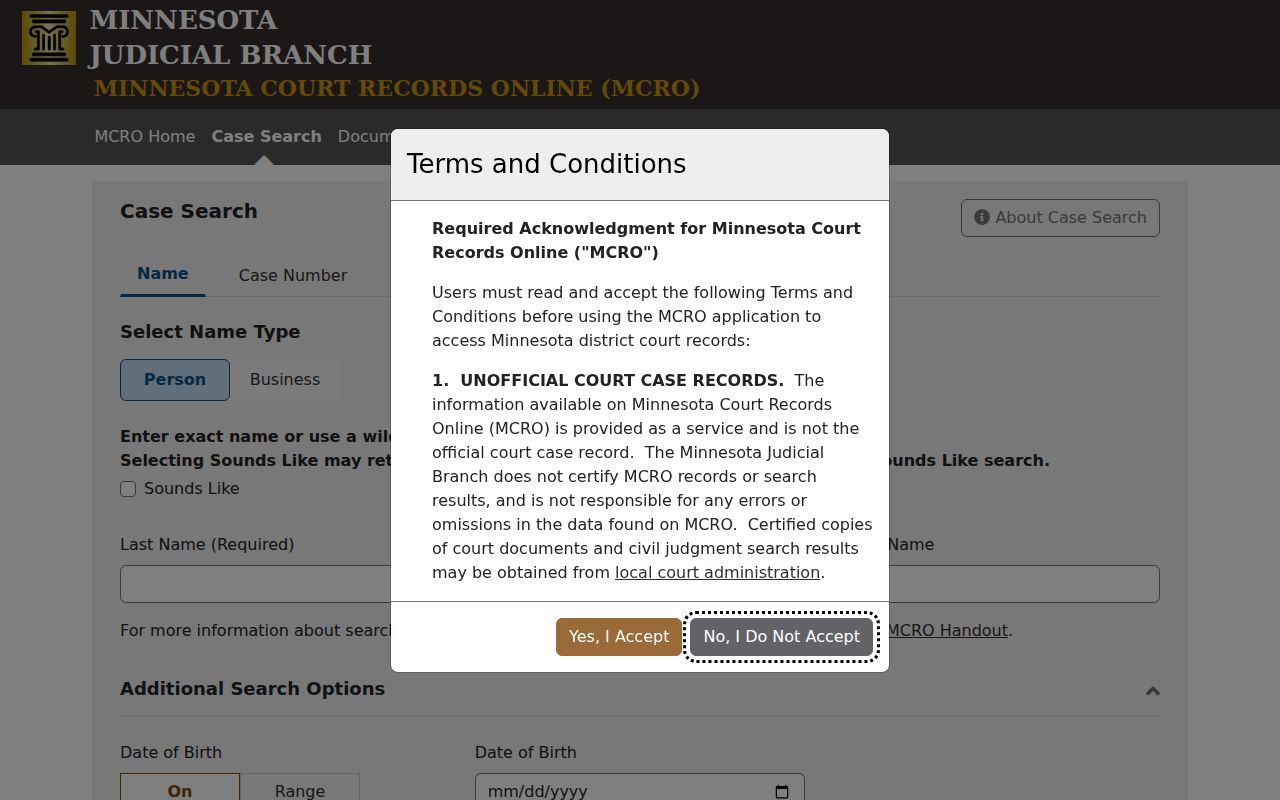
The live form is the best place to check current field labels, since Judicial Branch screens can change.
How Minnesota Dockets Flow Into MCRO
Every Minnesota case begins in the District Court of the county with venue. County court administration maintains the file inside the statewide case-management environment. Attorneys and many eligible public users submit filings through Minnesota Judicial Branch eFile and eServe (eFS). Clerk intake and other channels also feed information into the system. From there, events, document indexes, party data, status, and hearing information can surface in MCRO. Access rules and the online image inventory still apply.
The basic Minnesota path is County filing or intake → county court record → statewide case-management entry → eligible public view in MCRO. This is a flow of records, not a promise that every paper becomes a downloadable PDF. A document index number may be visible without an attached image. A current-day hearing may still sit under “Upcoming Hearings” on its date. Some personal fields are hidden remotely even when a Minnesota courthouse terminal offers broader access.
eFS is the filing side of the system, not a way to browse someone else's case. A self-represented filer can use it for eligible filings. But the public register is read in MCRO. Citations and some filing types take other intake paths, so an expected item may lag. Does a Minnesota record need review or correction? The county District Court Administrator is still the local office to call.
Which Courts Keep Dockets
Minnesota runs a unified court branch. District Court is the general-jurisdiction trial court in every county. It hears criminal, traffic, civil, family, probate, juvenile, mental-health, and other cases. Conciliation Court is a small-claims division of District Court, not a separate tier. The Minnesota Court of Appeals and Supreme Court keep their own appellate files. Federal cases sit in federal systems.
The table matches each court level to its search path. For a trial-court file, venue points to the county administration office holding the District Court record.
| Court or level | Docket covers | Where to search |
|---|---|---|
| Minnesota District Court | State trial cases, including criminal, traffic, civil, family, probate, and juvenile matters. | MCRO for eligible remote information; county Court Administration for the file. |
| Minnesota Conciliation Court | Qualifying small claims within the District Court structure. | MCRO and the county District Court Administrator. |
| Minnesota Court of Appeals and Supreme Court | State appeals and other matters within appellate jurisdiction. | P-MACS and the Clerk of the Appellate Courts. |
Not every Minnesota docket lives in the District Court system. The Minnesota Tax Court and the Workers' Compensation Court of Appeals run their own specialized dockets. Each is reached through its own tribunal channel. The same goes for federal cases. Federal District Court and bankruptcy filings sit entirely outside MCRO.
One more thing worth knowing. Minnesota's court structure is unified statewide. Venue and file custody still stay with the county District Court.
Why Minnesota Cases May Be Missing
A blank Minnesota search result does not mean the case never existed. The name may be spelled differently. Or the search may miss a middle initial, entity name, court file number, or citation. MCRO matches names exactly unless you pick Sounds Like or use a `*`. Those two tools cannot be combined. When a name feels shaky, try a Minnesota file number or attorney search instead.
Minnesota also has a pending-case rule that trips people up. A search by defendant name will not show pending criminal, traffic, or petty-misdemeanor matters that lack a conviction. A dismissal, or a continuance for dismissal, can still count as pending here. That is why a file number, citation number, or attorney name and bar number works better. Some Minnesota cases and data are restricted outright. Older public paper files may never have an online image.
Note: Confirm the county, case category, and filing date before treating a missing remote result as a custody or retention issue.
What a Minnesota Court Docket Shows
MCRO labels the Minnesota case activity list a Register of Actions. Depending on case type and access rules, it can display the court file number, case title and type, filing date, venue, judicial officer, status, and party roles. It also lists hearings, events, and links to Minnesota documents where they exist. Criminal dockets may add charge history and bond or bail activity. Interim conditions and a warrant indicator may appear too. Money judgments get a separate detail view. Not every screen shows every field.
A case-level status does not tell the whole story. It is not a full account of each charge, payment, related file, or later appeal. Read the entry itself, and open the linked order or filing whenever one is available.
| Minnesota case number | The court file number used to locate the case; enter it without spaces, with or without hyphens or leading zeroes. |
|---|---|
| Minnesota case title and parties | Caption and party roles, subject to protected-name and remote-display limits. |
| Minnesota venue and judicial officer | The county court location and assigned judge or referee; assignments may change. |
| Minnesota case events | Chronological filings and proceedings, often newest first, with a document index number when generated. |
| Hearings | Past or upcoming setting information; the notice controls specific appearance instructions. |
| Disposition and financial fields | Entered case or charge outcome and applicable fines, fees, payments, or balances. |
Reading Minnesota's Register of Actions
Think of the Minnesota Register of Actions as an event record. It is not a transcript and not the whole court file. Labels can be terse. An entry may appear even when no public image can be opened. When you ask court administration for a particular paper, cite the Minnesota event's index number. Dates deserve a careful read too. The newest notice controls, because a later Minnesota continuance or reset can replace an earlier setting.
- Case Events
- The chronological event list inside MCRO Case Details.
- Document Index Number
- A number tied to an event or document; it may exist without a public PDF.
- Minnesota disposition
- An entered outcome for a case or charge, which may not state the full legal effect.
- Continuance or reset
- A postponement or new setting; check later notices for the date that now controls.
- Related case
- A linked file that may remain separate and is not necessarily consolidated.
MCRO warns that a visible Minnesota active-warrant flag may belong to a different case for that party. Treat "upcoming" listings with the same caution, since a hearing can stay on the calendar on the day it is held or continued. For a Minnesota deadline, an operative order, or a current balance, go to the underlying document and contact the county custodian or the proper payment office.
When you ask a Minnesota court office to pull a specific filed paper, give the document index number.
Public Access to Minnesota Court Dockets
Minnesota court files follow the Rules of Public Access to the Records of the Minnesota Judicial Branch. The Minnesota Government Data Practices Act (MGDPA), Minn. Stat. chapter 13, does not govern requests for a judicial case file: Minn. Stat. § 13.90 exempts the judiciary from that chapter. It points to Supreme Court rules instead. For a District Court case, the county District Court Administrator remains the right custodian.
Public status and remote availability are two different questions. Rule 4 sorts accessible case data from restricted data. Rule 8 covers Minnesota inspection, copying, and remote access. A paper court record can be open at its place of custody yet absent from MCRO. Certain Minnesota juvenile-protection records stay off courthouse electronic access too. Sealing and expungement can narrow access further.
Minnesota access authorities:
Minnesota Rules of Public Access, Rules 4 and 8 define public-access categories and separate in-person inspection from remote electronic access.
Minn. Stat. chapter 609A governs expungement relief and related record restrictions.
Minn. Stat. § 260B.171 addresses confidentiality and access limits for juvenile delinquency records.
Minn. Stat. § 13.90 explains why judicial case data follows court rules rather than the usual MGDPA request model.
Minnesota Copy Fees and Court Records
Searching MCRO and downloading public Minnesota documents online costs nothing right now. A plain paper copy is free too. That comes from the statewide fee policy. Certification and exemplification are different services, handled separately by court administration. A local law-library fee can ride along with the base amount, so check the current Judicial Branch fee table. Then confirm the total with the county office before you send payment.
| Copy or service | Published statewide base |
|---|---|
| MCRO search or online public PDF | No charge |
| Minnesota plain paper copy | No charge; the former $8 charge ended July 1, 2023. |
| Minnesota certified copy | $14 per instrument. |
| Minnesota exemplified copy | $14; certified and exemplified together are $28. |
Before ordering anything, open the Minnesota District Court fee schedule. It lists the base certified and exemplified amounts and includes a county law-library-fee selector.
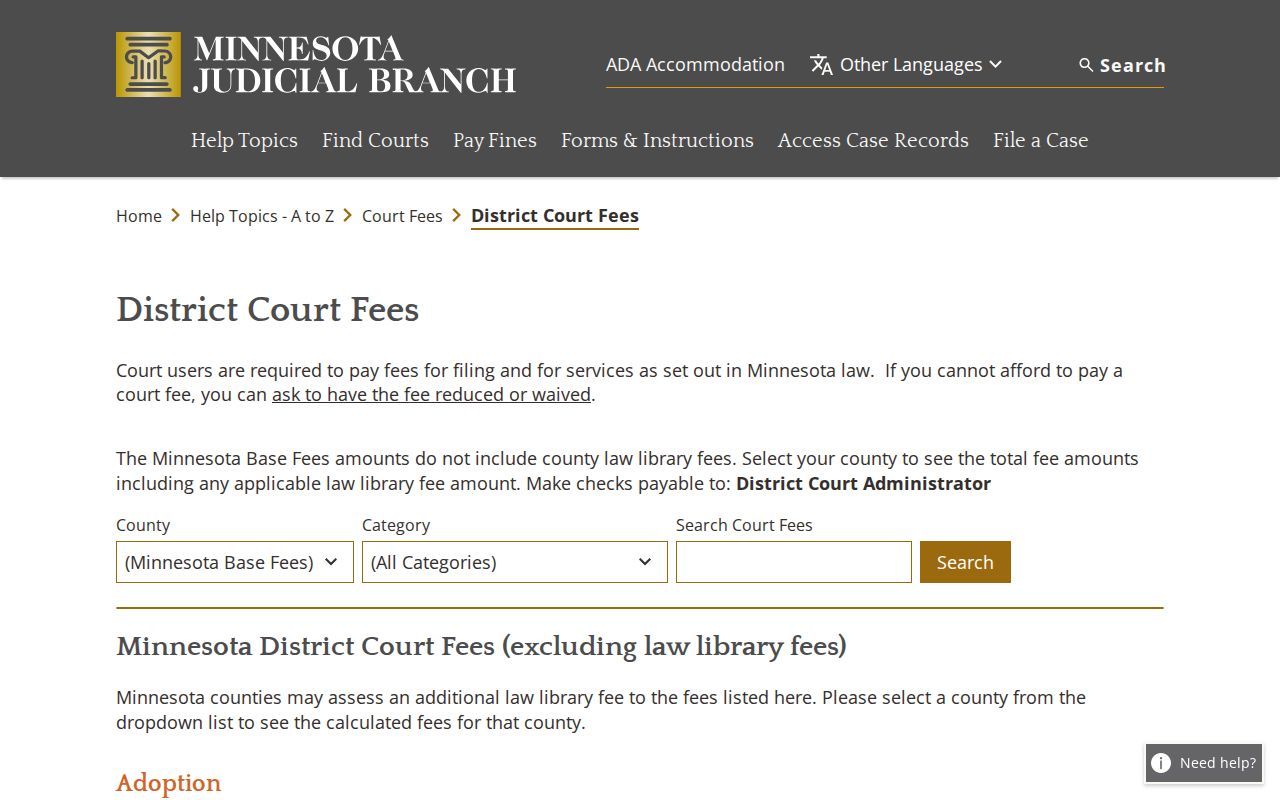
Any displayed county add-on is separate from the public MCRO search and plain-copy cost.
From MPA Remote to Minnesota MCRO
Minnesota's public case search arrived in stages. The Judicial Branch launched MCRO on March 17, 2021. Document Search came first. Case Search and Registers of Actions came next, in December 2021. Hearing Search and Judgment Search followed in August 2022. The old MPA Remote service then shut down on April 17, 2023. Each stage added something new to pull up. You could reach a Minnesota case, a filed document, a court date, or a docketed money judgment.
One thing the rollout did not do is digitize everything. Broad document coverage covers public Minnesota case types. It applies to documents filed on or after July 1, 2015. Some orders, judgments, opinions, and notices reach back further. But plenty of older paper was never imaged and may still need retrieval at the county. MCRO opens the current record. It is not a promise that the full history of every case sits online.
The Judicial Branch calls MCRO real-time access to Minnesota District Court registers. It publishes no numeric refresh interval, though, and no uptime promise. A new filing or image can lag before it shows in the Minnesota court record.
Note: Older Minnesota case files may need local retrieval. Statewide search does not guarantee that historical paper was ever imaged.
Minnesota Appeals Keep a Second Docket
Filing an appeal does not swallow the county District Court file. The trial register may show the notice of appeal and the transfer of the record, and the appeal itself then gets its own appellate case number, its own schedule of briefs, orders, and events, and eventually an opinion. A second docket, in short. The P-MACS appellate search handles Minnesota Court of Appeals and Supreme Court matters. The Clerk of the Appellate Courts keeps those files, apart from the County District Court Administrator who holds the trial record.
Do not look for the appellate database inside MCRO. It stands on its own. Public cases opened since March 3, 2003 carry fuller detail, while older entries may be abbreviated. Documents from cases opened January 1, 2014 or later are generally imaged, though some are still not available remotely. Searching P-MACS works by case number, title, case group, jurisdiction, status, type, subtype, and date range. The Minnesota appellate public search form shows those separate fields for locating a Minnesota state appeal.
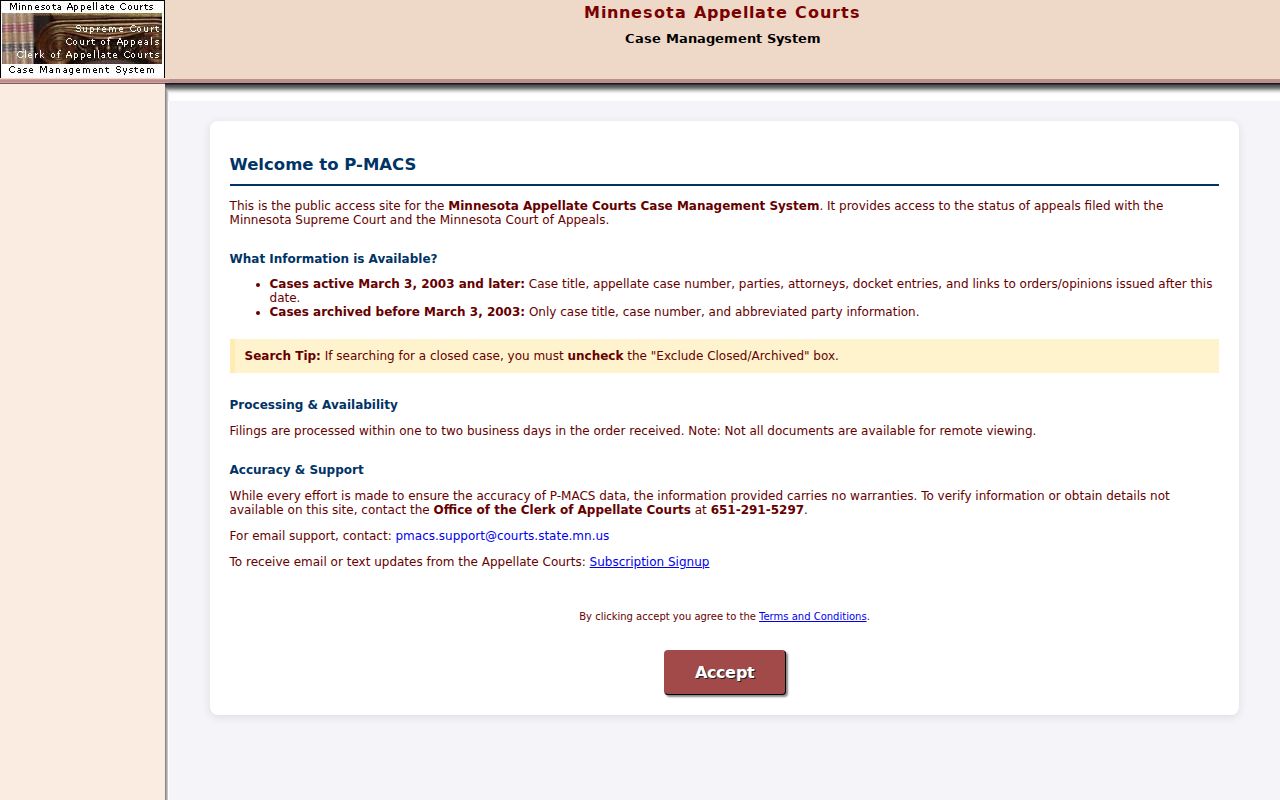
For an appeal, search by its appellate number and call the appellate clerk. For the trial-level events underneath it, go back to MCRO and the county court administration that holds the file.
Find Court Dockets by County in Minnesota
The county courthouse is where the file actually lives. Court administration there handles local questions, archives, public terminals, and copies. By April 1, 2025 county population estimates released in July 2026, these are Minnesota's six largest counties by population, not by filing volume. Each card links to that county's court docket resource.
Hennepin County
Minneapolis · Fourth Judicial District; 1,313,127 residents in the 2025 estimate and the state’s largest urban court system.
Ramsey County
St. Paul · Second Judicial District; 557,123 residents in the 2025 estimate, with records held by county court administration.
Dakota County
Hastings · First Judicial District; 462,169 residents in the 2025 estimate and a large southeastern metro court network.
Anoka County
Anoka · Tenth Judicial District; 382,119 residents in the 2025 estimate, serving a major northern metro county.
Washington County
Stillwater · Tenth Judicial District; 291,448 residents in the 2025 estimate and home to the 1869 county courthouse, Minnesota’s oldest.
St. Louis County
Duluth · Sixth Judicial District and the state estimate series’ sixth-largest county, with a northern regional court hub.
The directory of all 87 Minnesota counties covers the rest, with a court docket site for every county in the state.